
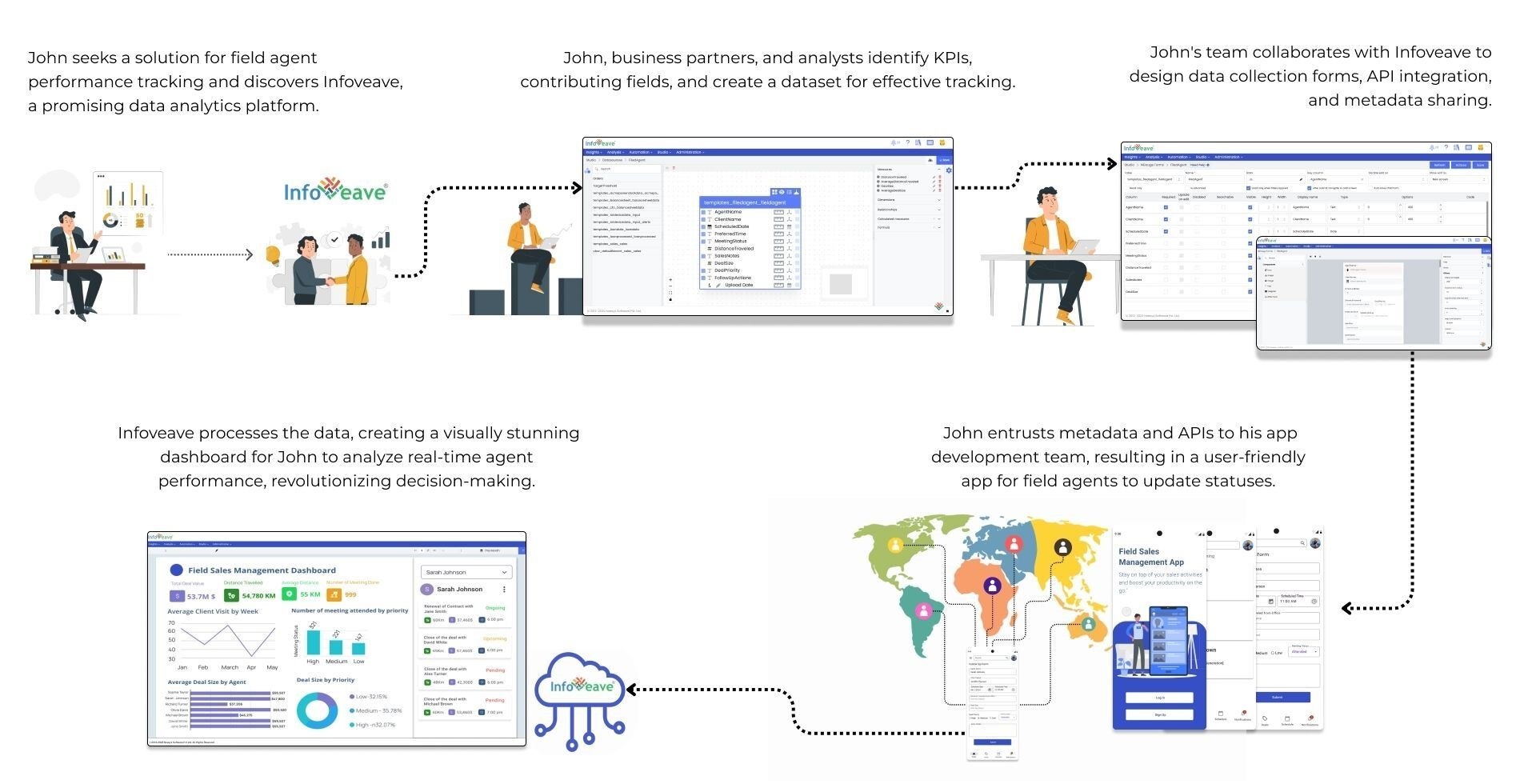
Data Apps: build your own app with trusted data

  • Create forms in NGauge Forms and collect data without writing code
  • Validate records against data quality rules before the app acts on them
  • Control who can see which data, and who can take which action
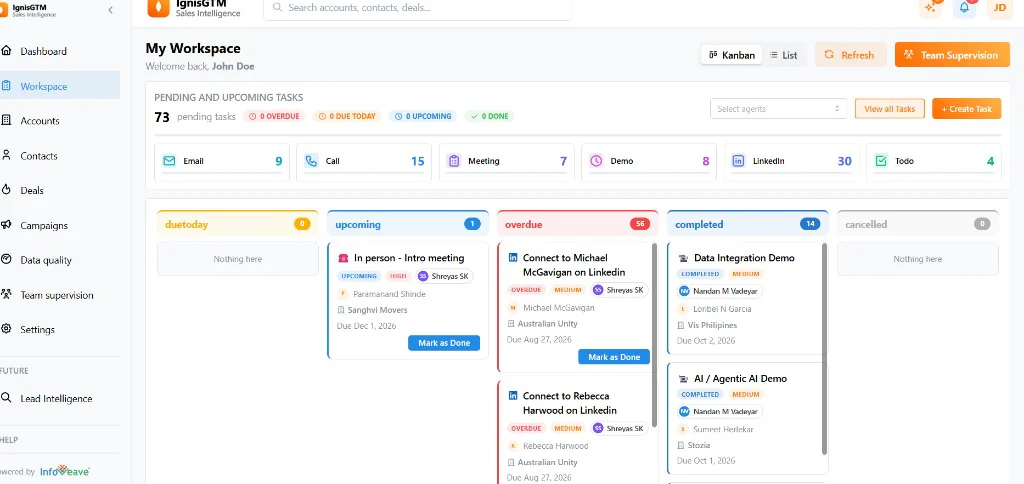
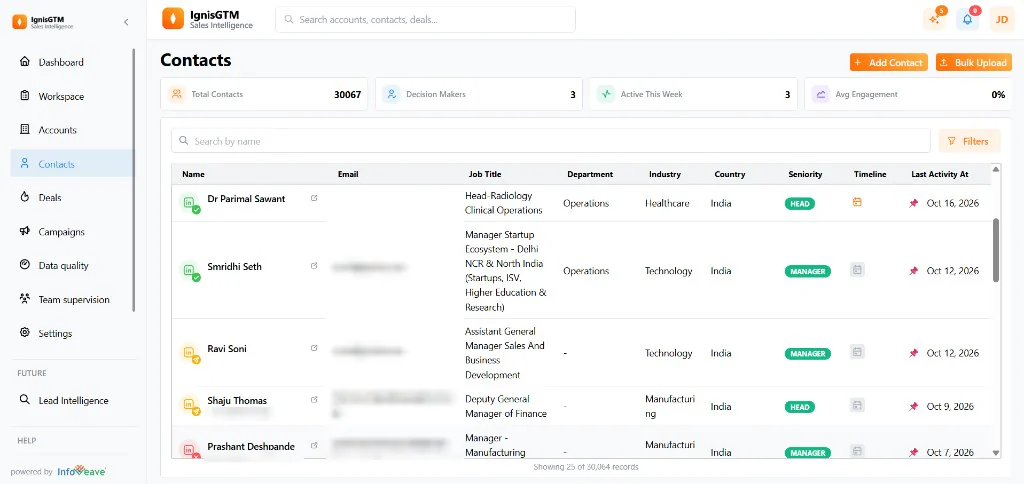
IgnisGTM workspace, a sales app built on Infoveave, showing sales tasks on a Kanban board grouped by due date and status

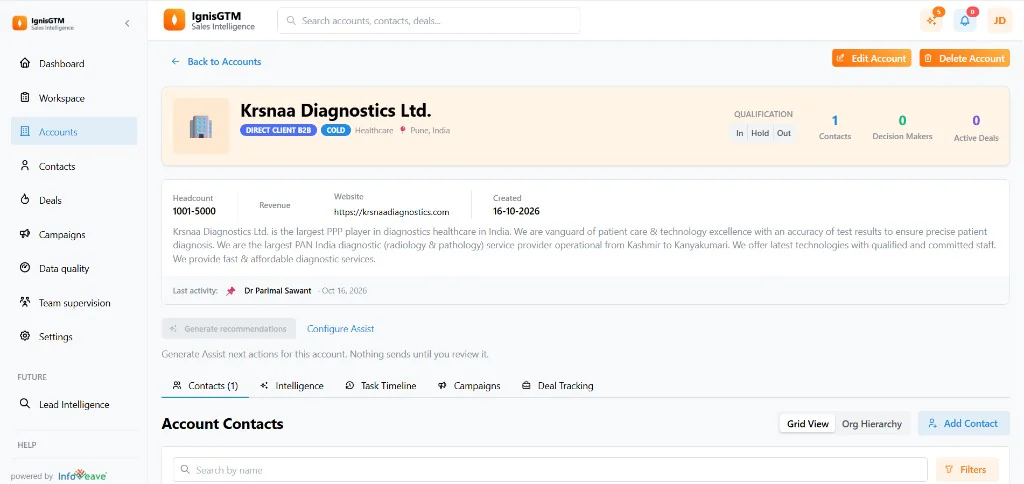
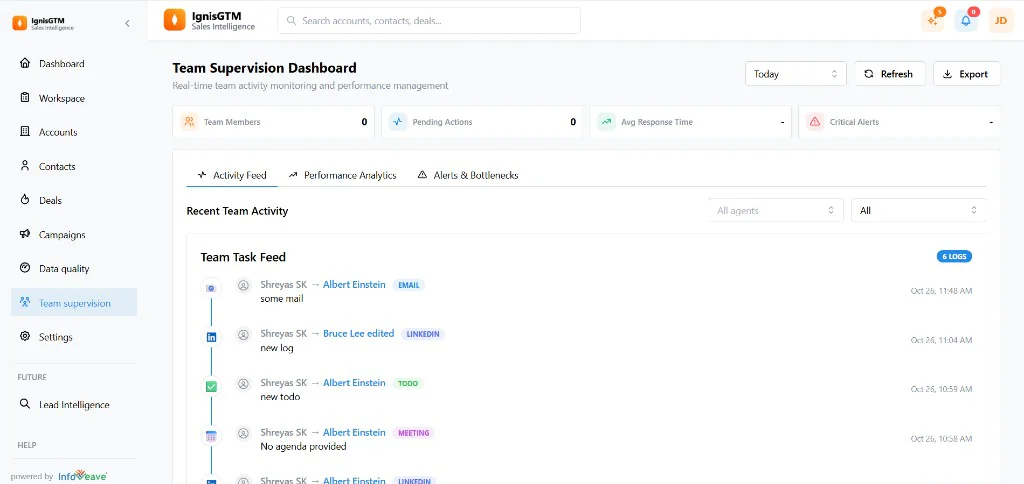
IgnisGTM, a sales intelligence app built on Infoveave

What it is

Data Apps turn your last-mile data into governed business workflows

What is a Data App?

Data Apps let you build low-code apps for the workflows that off-the-shelf software leaves out. They handle last-mile data collection and data management, and link to automations that trigger the next action. Because the app runs on the same Unified Data Platform as your data, it inherits the data quality rules and access controls you have already defined. You do not rebuild them for each new app.

Build

Create forms and data-driven apps with NGauge Forms, with no code.

See NGauge Forms

Trust

Validate records against data quality rules and control access by role and data scope.

Data QualityData Governance

Act

Route requests, notify owners and trigger the next step with workflow automation.

Data Automation

NGauge Forms

Everything you need to collect, validate and act on data

NGauge Forms is the interface layer of your app. Here is what you can do with it.

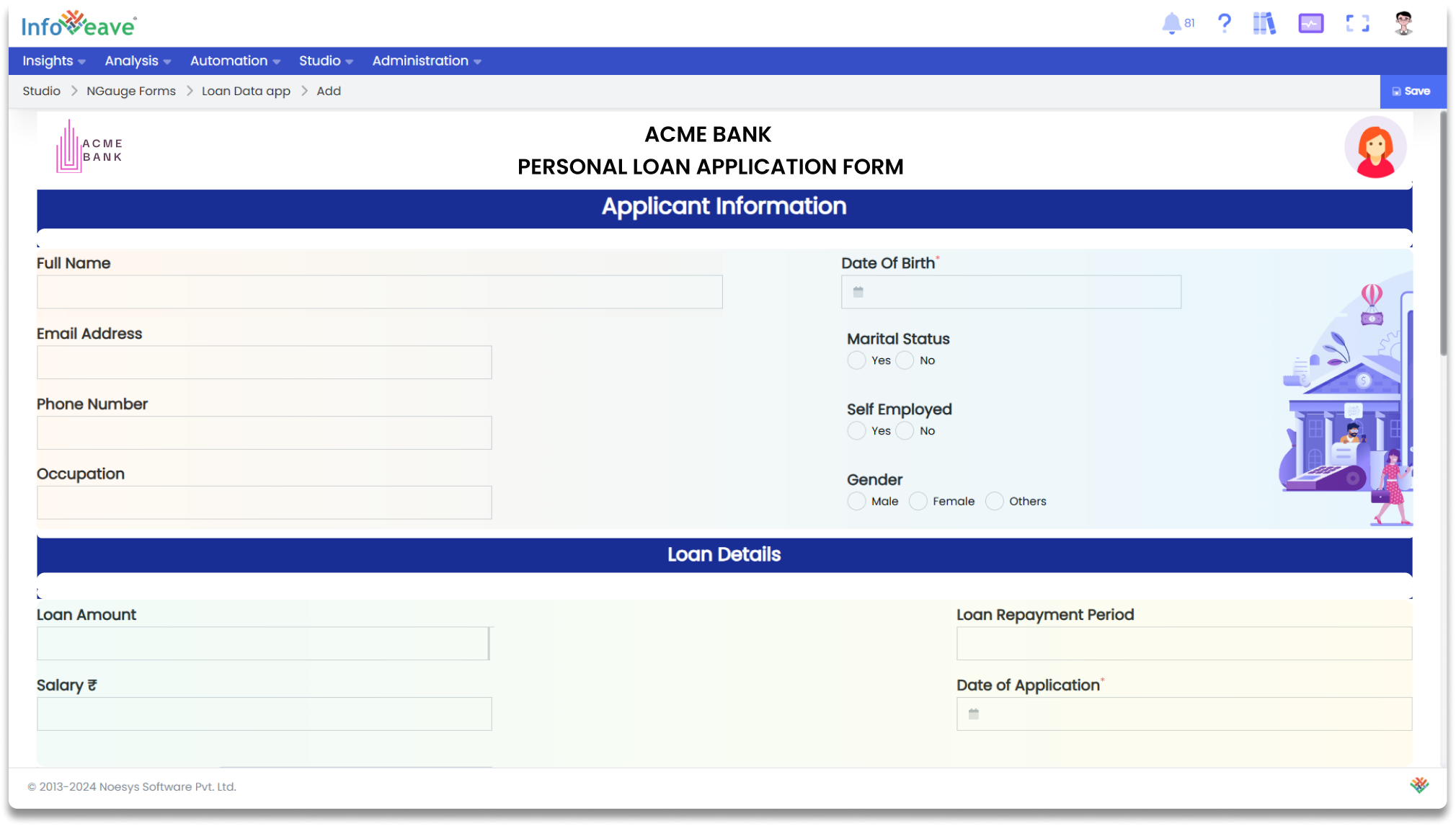
NGauge Forms designer in Infoveave

Build the form your process needs

Design forms around your own process and its required fields, replacing email threads and spreadsheets. Build your first form in minutes, with no code. Choose field types, add conditional logic, start from a template, and reuse or clone a form for the next process.

NGauge Forms data collection screen in Infoveave

Collect data and manage it, not just capture it

NGauge Forms handles both last-mile data collection and ongoing data management. Authorized users can submit new records and, where permitted, view and update existing ones in the same app, including bulk or grid entry and attachments. Every form runs inside Infoveave's role-based access and audit controls.

See how access works
Governed records collected through NGauge Forms

Check records before they move on

Run data quality rules against submitted data: not-null, value range, pattern, uniqueness and recent-data checks. A record that fails a mandatory check is returned for correction instead of moving on as if it were complete.

Explore Data Quality
Infoveave data app connected to platform workflows

Link every form to a workflow

Connect a form to workflow automation. When a request passes its checks, route it to the right reviewer, notify the people responsible and track outstanding actions. Failed checks go back to the team that fixes them.

Explore Data Automation

See NGauge Forms with your own use case

Book a personalized demo with the data experts.

Governed access

One app, a different view for every role

Putting several departments into one app should not mean showing everyone everything. Infoveave controls both what each user can see and what they can do.

Role-based permissions

Set fine-grained permissions at the application, module and feature level, with roles built around business responsibilities.

Custom roles are available in the Enterprise version.

Data-scoped visibility

Admins share specific datasources with each user and apply dimension filters (for example, Store is Store 12), so restricted records are not retrieved at all. A store manager sees their store and a regional manager sees their region.

Audit and version history

Audit logs record user access to assets and every action performed. Version history covers user-entered data as well as queries and workflows.

Example - Inventory exceptions app used by two roles

The Store Manager for Store 12 sees 2 of 6 records, while the Regional Manager sees 3 of 6 across the North region, all from the same shared data.

See the full role-based access exampleSee how access control works

How it works

From data foundation to a working app in six steps

  1. 1

    Connect and unify

    50+ connectors bring source systems into one managed foundation, with built-in transformations that align records and definitions.

  2. 2

    Define quality rules

    Data quality profiles for the datasets the app will use, run on a schedule or inside a workflow.

  3. 3

    Set roles and access

    Roles, shared datasources and dimension filters: each user sees only the data their job needs.

    Reusable foundation: the same datasets, rules and roles can serve your next app, report or workflow

  4. 4

    Build

    Design the NGauge Form with field types, conditional logic and templates, with no code.

  5. 5

    Route

    Connect the form to a workflow so requests that pass their checks go to the right reviewer, and the people responsible are notified.

  6. 6

    Monitor

    Track failures, approvals, exceptions and outstanding actions as the app runs.

Example · Governed purchasing app

  1. Collect

    The Purchasing app, an NGauge Form, opens pre-filled with the forecast, stock by DC, open POs and the supplier record. The buyer enters quantities, delivery DC, need-by date, unit cost and payment terms.

    submit
  2. Validate

    Rules check the approved supplier list, the month's stock budget, the price band and the supplier's lead time before the PO moves on.

    checks pass
  3. Route

    A PO above the buyer's limit goes to the head of buying, with the plan, the stock position and the supplier record attached.

If checks fail, the record is returned to Collect for correction.

Illustrative example. Permissions, approvals and write-back are configured and tested per implementation.

Use cases

Build once, govern once, reuse everywhere

When every app is built on its own, validation rules get duplicated, access lists multiply and the same metric ends up with two definitions. Building on a shared data foundation lets common datasets, quality standards and access policies serve each new app. The same approach adapts to any process that needs controlled data collection and action.

Retail purchasing on plan, stock and supplier data

Pre-fill a purchase order from the plan, stock and supplier record, check it as it saves, and capture the batch at the dock so a later defect traces back to the order.

Read the use case

Inventory exception management

Let store managers investigate stock discrepancies and request replenishment in one interface.

Read the role-based access guide

Retail customer care on CRM and OMS data

Give care agents one matched customer view of OMS orders, open tickets, loyalty tier and consent, and log each outcome as structured fields.

Read the use case

Retail budgeting on OMS data

Start category budgets pre-filled from OMS and ledger history, validate inputs before approval and keep every reforecast linked to its budget.

Read the use case

Retail order management on OMS data

Show stock by location and the earliest promise date beside every order line, flag late-delivery risk and route exceptions for approval.

Read the use case

Retail complaint management on order data

Match every complaint to its order, batch and supplier, capture it as structured fields, score escalation risk and route supplier action.

Read the use case

Retail SLA tracking on OMS and carrier data

Flag parcels at risk of missing a carrier SLA, record each cause and exclusion as fields, and build credit claims from your own record.

Read the use case

Retail from buy to retain, end to end

Follow one quarter across buying, finance, the order desk, fulfilment, quality and customer care, with six apps reading and writing the same governed datasets.

Read the end-to-end use case

In practice

Data Apps in use

One team edits forecasts in NGauge Forms. Another runs estimating on a shared calculation pattern. Both sit on governed data.

NGauge Forms

Inventory forecasting for a global electronics distributor

Planners manage forecasts, pricing updates, and new model launches in NGauge Forms, without waiting on IT. Built-in validations keep entries accurate, and changes show across planning views in real time. SAP sales, purchase, inventory, and in-transit data sit in one planning platform.

Improved forecast accuracy. Clearer on-hand and in-transit stock. Less spreadsheet planning.

Read the story
Governed data app

An infrastructure estimating app

An Australian infrastructure estimating application runs on Infoveave's Unified Data Platform: reference data served from governed tables, configurable calculation modules, timestamped saved runs, exports and role-based access tiers.

8 infrastructure categories on one calculation pattern, instead of a separate spreadsheet model per asset class.

Read the story

Book a personalized demo with the data experts.

Book a Demo

Why Infoveave

Most low-code tools build the interface. Infoveave builds it on trusted data.

A form is easy to create. Keeping the data behind it validated, governed and reusable is the harder part, and it is built into the same platform as the app. Spreadsheets, generic form tools and one-off custom builds each handle that work differently. Infoveave's Data Apps include these capabilities.

  • Data validation before use

    Data quality rules run on submitted data before the app acts on the record.

  • Role and data-scoped access

    Roles plus dimension filters on shared datasources decide what each user can see and do.

  • Workflow after submit

    Workflows linked to NGauge Forms route requests, notify owners and track outstanding actions.

  • Audit and version history

    Audit logs and version history cover access, actions, queries, workflows and user-entered data.

  • Reuse across apps

    Shared datasets, rules and definitions serve the next app, report or workflow.

  • AI-Driven Recommendations

    Agentic AI that guides next-best actions with full operational context.

Frequently Asked Questions

Ready to build an app your business can trust?

Book a personalised demo with the data experts.

Security and compliance: ISO 27001 · ISO 27017 · ISO 27701 · SOC 2 Type II · GDPR · HIPAA · CCPA. Learn more at the Trust Center

Ready to see Infoveave in action?

Book a Demo
ISO 27001ISO 27017ISO 27701GDPRHIPAACCPAAICPACSR LogoCapterra Reviews — Infoveave

© 2026 Noesys Software Pvt Ltd

Infoveave® is a product of Noesys

All Rights Reserved