Ready to revolutionize your data journey with Infoveave?
Recent Blogs
One order, three locations, one promise: retail order management on OMS data
A retail story on Infoveave Data Apps and Unified Decision Intelligence
USE CASE · RETAIL | ORDER MANAGEMENT | DATA APPS
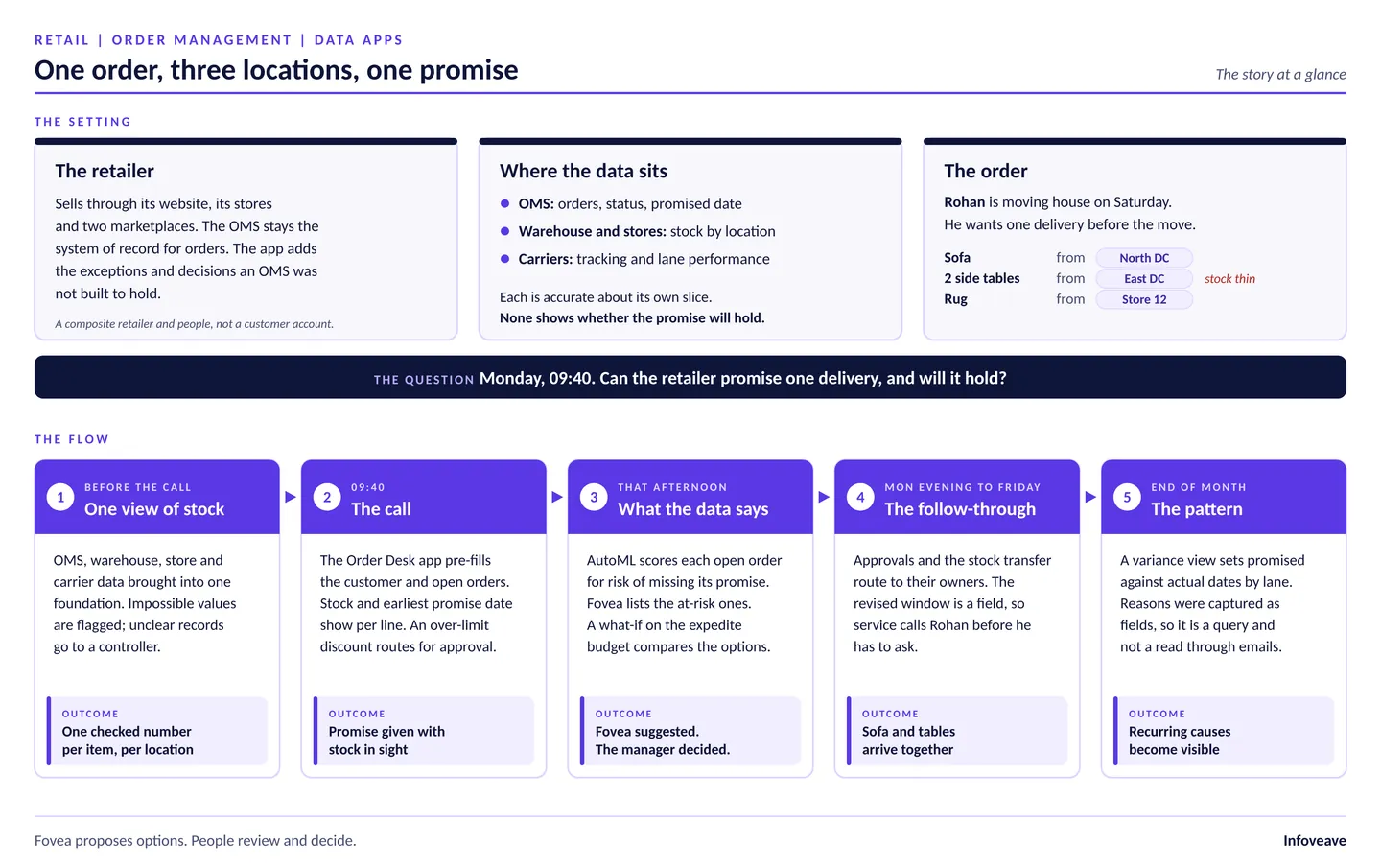
A retailer's order data lives in several places. The order management system (OMS) holds orders, their status and the promised date. The warehouse and stores hold stock by location. Carriers hold the tracking. Each is right about its own slice, but none shows whether the promise will hold. Infoveave Data Apps close that gap.
Definition: Order management system (OMS)
An order management system (OMS) is a retailer's system of record for orders: what was ordered, where it stands and the date promised. Stock sits in
warehouse and store systems, and tracking with carriers. Keeping a promise takes all three.
Here's one order's week, run differently, on Infoveave. The retailer sells through its website, its stores and two marketplaces. The retailer and its people are a composite, not a customer account. The OMS stays the system of record for orders. The app adds what an OMS wasn't built to hold: exception handling, structured capture and the context behind each decision.
Rohan moves house on Saturday. On Monday morning he calls to order a sofa, two side tables and a rug, and asks for one delivery before the move. The sofa is at the north distribution centre (DC). The tables are at the east DC, where stock is thin. The rug is in Store 12. At many retailers, the agent sees a default promise date and nothing about the carrier lane that's been slow all week. So Rohan hears a date. Nobody knows yet if it'll hold.
$1.73T
yearly cost of out-of-stocks and overstocks to retailers, 6.5% of retail sales (IHL Group, 2025) [1]
~60%
of consumers had at least one delivery problem in three months (Sendcloud, 2025) [2]
80%+
of consumers expect immediate notice of delivery delays (Sendcloud, 2025) [2]
The use case in brief
One checked view for your order desk, warehouse and operations team: orders pre-filled, exceptions as validated fields, access by role, and revised delivery
windows that reach the service owner first.
In this article:
- One view of availability
- The call
- What the data says about orders like Rohan's
- The follow-through
- The pattern
- How does Infoveave build this end to end?
- What is set for each implementation?
- The takeaway for order management
- Frequently Asked Questions
- See it on your own data
Before the call
One view of availability: stock by location across OMS, warehouse and stores
One item's stock sits in several places: available-to-promise in the OMS, counts in the warehouse and stores, and supplier backorders. Infoveave pipelines bring OMS, warehouse, store stock, carrier and customer data into one foundation. Rules agreed with the retailer's team standardise item, location and carrier codes. Data quality checks flag anything that can't be right, like negative stock or a postcode that doesn't exist. If a rule can decide, the record passes. If it can't, a workflow sends it to an inventory controller, who decides.
By Monday, availability is one checked number per item, per location.
Behind the scene
Connect. Fusedata pipelines and built-in transformations line up item, location and carrier codes across OMS, warehouse, store stock and carrier data.
Trust. Data quality profiles run not-null, range and reference data checks. Anything that needs judgement goes to the person who fixes it.
Why it matters. IHL Group's 2025 study puts the cost of out-of-stocks and overstocks at $1.73 trillion a year, or 6.5% of retail sales [1]. You can't promise dates that hold without a checked view of stock by location.
09:40
The call: stock and promise dates on the order desk
The agent opens the Order Desk app, an NGauge Form. Rohan's profile, address and open orders are already on screen. As the agent adds each item, stock by location and the earliest promise date appear beside the line. A single Friday delivery means moving the tables from the east DC. And Rohan wants one delivery.
The agent logs the outcome in structured fields: requested date, delivery window, substitution allowed, promise date given and reason code. Data quality rules check the entry as it's saved. The bundle discount is over the agent's limit, so the form sends it to the order operations manager, with the order context attached.
Behind the scene
Capture. NGauge Forms arrive pre-filled with customer, order and stock data from governed datasets. Structured fields replace emails, spreadsheets and free-text notes.
Trust. Not-null, pattern and reference data checks run before the record moves on.
Govern. Role-based permissions, shared datasources and dimension filters (for example, Channel is Phone). Dataset classification can mark customer datasets as sensitive.
That afternoon
What the data says about orders like Rohan's: late-delivery risk
The order operations manager opens the Order Risk Infoboard: open orders by fulfilment node, carrier lane and promise date, with expedite cost so far. An AutoML model uses past patterns to score how likely each open order is to miss its promise. Rohan's order lands in the higher-risk group. The north lane has been slow, and the east DC is short on tables. It's a probability, not a verdict.
The manager asks Fovea which orders promised by Friday ship from the north DC and carry a higher risk. Fovea returns the list and suggests two steps that fit the expedite budget. Move the tables on the next east-to-north transfer, or upgrade the carrier on that lane. A what-if on the expedite budget weighs each option's cost against the promises it's expected to keep. The manager sets a limit.
Fovea suggested. The manager decided.
Behind the scene
Analyse. Infoboards show open orders by node, lane and promise date, with expedite cost.
Anticipate. AutoML scores late-delivery risk. What-if analysis tests the expedite budget.
Reason. Fovea answers plain-language questions from governed data and proposes options for the manager to review.
Why it matters. In Sendcloud's 2025 survey of 8,000 European consumers, nearly 60% had at least one delivery problem in the previous three months [2]. Spotting at-risk orders before the date passes gives the desk time to act.
Give every promise date one checked view of stock
See stock, late-delivery risk and approvals in one governed Order Desk app.
Monday evening to Friday
The follow-through: approvals and a revised delivery window
The discount and expedite approvals route to the order operations manager, within delegated authority. The transfer request goes to the warehouse lead. Each owner gets notified, and every action stays on the outstanding list until it's closed. The revised delivery window is a field on the order. So the service owner spots it on Tuesday and calls Rohan before he has to ask. On Friday, the sofa and the tables arrive together.
Behind the scene
Route. Workflows linked to NGauge Forms handle approvals, notifications and outstanding actions.
Record and reuse. Where write-back is set up, promise date, reason and approval fields update governed tables that other apps, reports and workflows can use. Updating the OMS itself depends on the retailer's architecture and the supported connectors.
Why it matters. The same Sendcloud survey found that over 80% of consumers expect immediate notice of a delivery delay [2]. Once a change is a field, you can build a notification on it.
Case Study — Logistics Data Quality
A third-party logistics provider couldn't trust its SLA metrics across regions: waybill numbers didn't match, pin codes pointed to the wrong hubs and non-delivery reasons weren't standardised. Infoveave added validation rules and a pin-code-to-hub check that hold bad records until they're fixed.
Pin code validationStandardised reason codesReliable SLA metricsTrusted dashboards
End of month
The pattern: promised against actual dates by node and lane
The manager looks across orders. Which nodes and lanes miss their promise most often? Which reason codes keep coming back? And what did the expedite spend buy in promises kept? A variance view sets promised dates against actual dates by lane. Because the reasons were captured as fields, this is a dashboard query, not a trawl through email threads.
Behind the scene
Monitor and audit. Audit logs record who accessed order and customer data, and every action taken. Version history of user-entered data shows how a promise date or approval changed.
How Data Apps work
The Order Desk app is built with NGauge Forms on governed data. See how Data Apps combine low-code forms, data quality, role-based access and workflow
automation.
How does Infoveave build this end to end?
Rohan's week didn't need a second tool. Infoveave calls this Unified Decision Intelligence (UDI): data, context, AI and action brought together on one connected platform, so each decision is informed, connected and actionable.
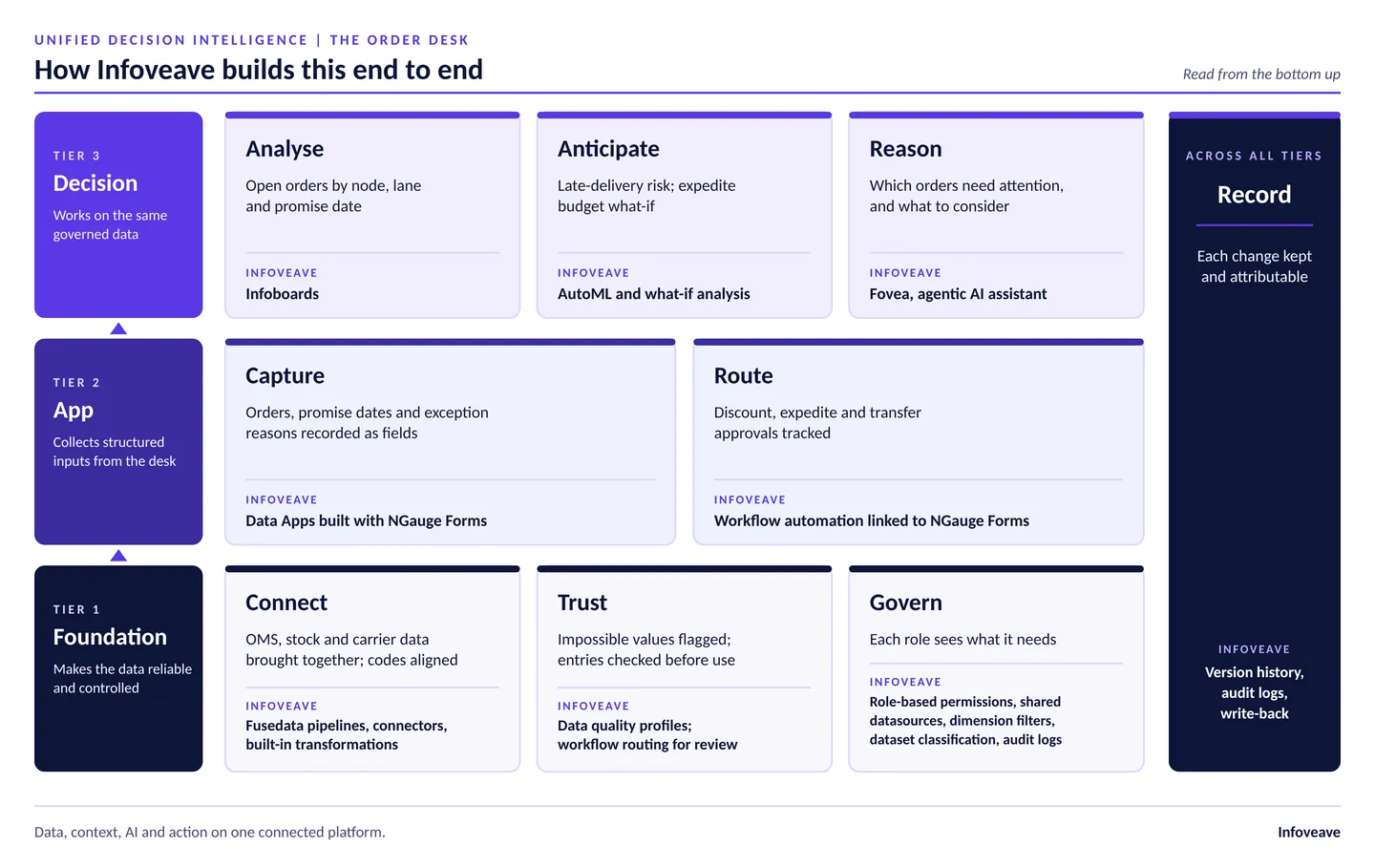
Read it from the bottom up and the story has three tiers. The foundation (Connect, Trust, Govern) keeps the data reliable and controlled. The app tier (Capture, Route) collects structured inputs. The decision tier (Analyse, Anticipate, Reason) works on that same governed data, and Record keeps each action attributable.
Layer
In the story
Infoveave capability
Connect
In the story
OMS, stock and carrier data brought together; codes aligned
Infoveave capability
Fusedata pipelines, connectors, built-in transformations
Trust
In the story
Impossible values flagged; entries checked before use
Infoveave capability
Data quality profiles; workflow routing for review
Govern
In the story
Each role sees what it needs
Infoveave capability
Role-based permissions, shared datasources, dimension filters, dataset classification, audit logs
Capture
In the story
Orders, promise dates and exception reasons recorded as fields
Infoveave capability
Data Apps built with NGauge Forms
Route
In the story
Discount, expedite and transfer approvals tracked
Infoveave capability
Workflow automation linked to NGauge Forms
Analyse
In the story
Open orders by node, lane and promise date
Infoveave capability
Infoboards
Anticipate
In the story
Late-delivery risk; expedite budget what-if
Infoveave capability
AutoML and what-if analysis
Reason
In the story
Which orders need attention, and what to consider
Infoveave capability
Fovea, agentic AI assistant
Record
In the story
Each change kept and attributable
Infoveave capability
Version history, audit logs, write-back
Connect and Trust give the desk one checked view of availability, the precondition for a promise date the retailer can keep. Capture puts that view in front of the agent. Order data also carries customer and commercial detail, so Govern follows role: margins and discount authority show only where they're needed. You can deploy Infoveave as a complete Unified Decision Intelligence solution, or add it as the reasoning layer on top of your existing data and analytics stack.
Related Reading
Seeing phantom stock? Read: Retail Inventory Planning with Phantom Inventory Detection
What is set for each implementation?
The rules that decide an exception: which checks pass automatically and which go to a controller. Set these with your team.
Promise-date logic and approval limits, which your business owners define. Custom roles need the Enterprise version.
Which connectors bring in the source data from OMS, warehouse, stores and carriers.
How records are written back, including any update to the OMS.
How deep and clean your order and carrier history is. A risk score is only as good as the data behind it.
Fovea proposes options. People review and decide. That's the design, not a limitation.
The takeaway for order management
Retailers rarely lack order data. What the order desk, the warehouse and the operations team don't have is one checked view they can act on and add to.
In Rohan's week, that view was a Data App on Infoveave. Availability was checked. Orders arrived pre-filled. Exceptions became validated fields, and access followed role. A risk score and Fovea worked on the same data, and the revised window reached the service owner before the customer had to ask. People still made the calls. A sensible first step is narrow: one exception type, such as orders that need stock from more than one location, with one set of reason codes, one approval limit and one role for each audience. The checks and access policies you build there carry over to the next app.
Frequently Asked Questions
What is a Data App on Infoveave?
It's an app built with NGauge Forms on governed data, combining low-code forms, data quality checks, role-based access and workflow automation. See Data Apps.
What does an order management system do in retail?
An OMS is a retailer's system of record for orders: it captures them across channels, tracks status and sets the promised date. It doesn't hold exception reasons or decision context; an Infoveave Data App adds that layer.
How does Infoveave flag orders at risk of missing their promise date?
An AutoML model scores each open order's risk of missing its promise from past order and carrier patterns. Early warning matters: nearly 60% of consumers had at least one delivery problem in three months, according to Sendcloud's E-commerce Delivery Compass 2025.
What does Fovea do in a retail order management workflow?
Fovea is Infoveave's agentic AI assistant. Ask which Friday orders from one distribution centre carry a higher risk, and it answers from governed data and suggests options within the expedite budget, like a stock transfer or carrier upgrade. Fovea suggests; the manager decides.
Where should a retailer start with an order management Data App?
Start narrow: one exception type, such as orders needing stock from more than one location, with one set of reason codes, one approval limit and one role per audience. Retail teams can start from retail analytics and operations analytics.
See it on your own data
Data Apps are built on the same platform as data quality, governance and analytics. Read how they fit together on the Data Apps page, or book a demo and we'll walk you through an order desk app using your data.
Also in the series: The budget that kept pace with the orders: the retail budgeting story, One complaint, four reports, one root cause: the retail complaints story and Promised Tuesday. Flagged Monday: the retail SLA tracking story
Results depend on the quality of the implementation, the suitability of the underlying data and your organisation's commitment to defining and maintaining its
governance policies.
Want to see an Order Desk app on your own data?
Checked availability · Governed Data Apps · Fovea
Book a DemoExplore the Platform
Explore Industry Solutions
About the Authors
This article was produced by the Infoveave Product and Solutions Team — specialists in Unified data platforms, agentic BI, and enterprise analytics. Infoveave (by Noesys Software) helps organizations unify data, automate business process, and act faster with AI-powered insights.
Ready to see Infoveave in action?


